Guide · How to · Updated November 14, 2026 · 10 min read
How to post an ad on Craigslist (with pictures): the 2026 step-by-step guide
Every screen of Craigslist's posting flow, in order: picking your area, type and category, writing the ad, adding photos, and the email and phone checks that decide whether it actually goes live.
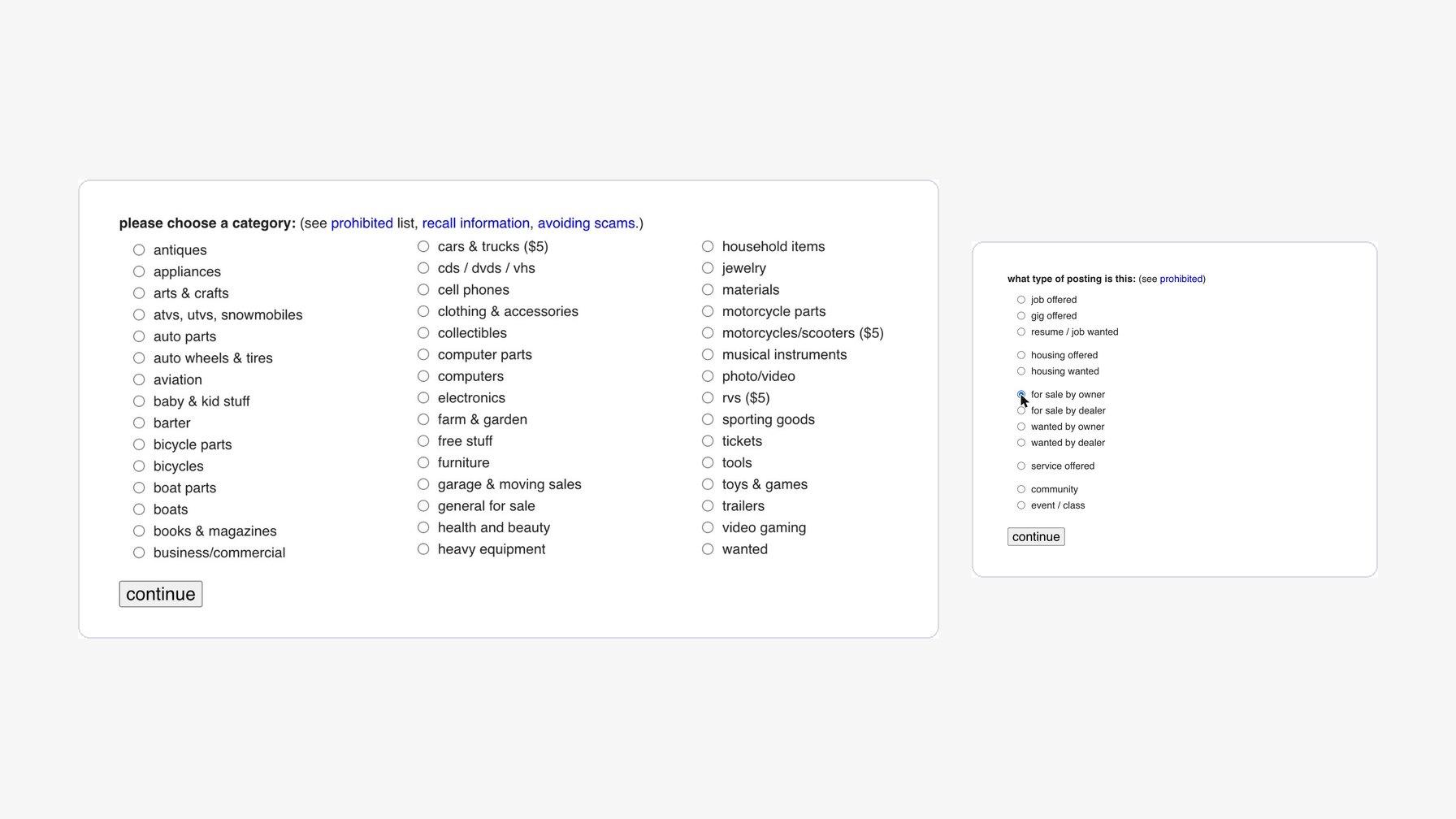
Quick answer: to post an ad on Craigslist, open your city's site, click create a posting, choose a type (for example for sale by owner) and a category, then write a title, price and description. Confirm the map, add photos (the first one is the one buyers see in search), review the draft and click publish. Finish by clicking the link Craigslist emails you and, if asked, entering a code sent to your phone. The ad goes live about 15 minutes later.
That's the whole flow in one paragraph. The rest of this guide walks through every screen in order, with screenshots taken from Craigslist's live posting flow in November 2026, and covers the parts that trip people up: which category costs money, how photos work, what the phone check is, and why an ad sometimes never shows up.
What you need before you start
Get these together first and posting takes about five minutes:
- An email address you can open right now. Craigslist emails a confirmation link from robot@craigslist.org, and the ad isn't live until you click it.
- A real mobile or landline number. Some posts require phone verification by voice or text. Craigslist doesn't accept VOIP numbers (Google Voice and similar) or international numbers for this.
- Photos on the device you're posting from. JPGs upload most reliably.
- The price, and the ZIP code where the item is or the job is.
- Your title and description. It's easier to write them in a notes app and paste them in than to compose in the form.
You don't need an account. You can post with just an email address. An account helps later, because renewing a free post is done from the account page.
How to post an ad on Craigslist, step by step
Step 1: Open your city's Craigslist and click "create a posting"
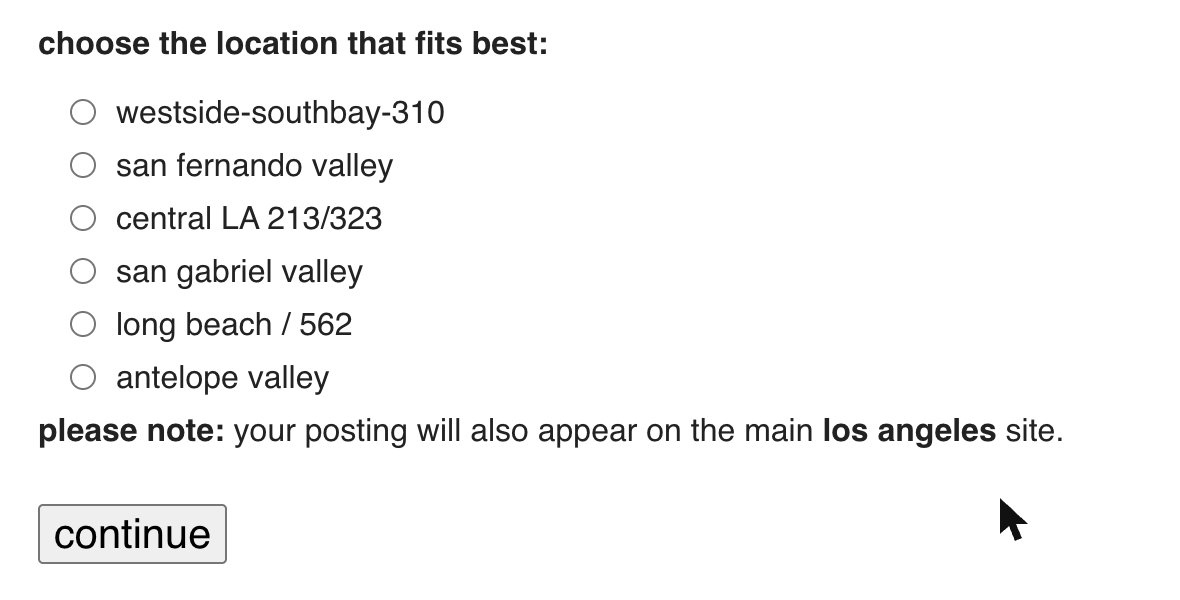
Go to craigslist.org, pick the city closest to where the buyer, renter or worker needs to be, and click create a posting at the top left. In large metros Craigslist then asks you to pick the sub-area that fits best. Los Angeles, for example, splits into westside-southbay, San Fernando Valley, central LA, San Gabriel Valley, Long Beach and Antelope Valley. Your post still appears on the main city site too.
Step 2: Choose the type of posting
This is the most important choice in the flow, because you can't change the type after you publish. Your options:
- for sale by owner — you're a private person selling your own things
- for sale by dealer — you sell as a business (a store, a lot, a reseller)
- job offered, gig offered — paid work, full-time or one-off
- housing offered — rentals, rooms, commercial space
- service offered — you're a business offering a service
- wanted, community, event / class — everything else
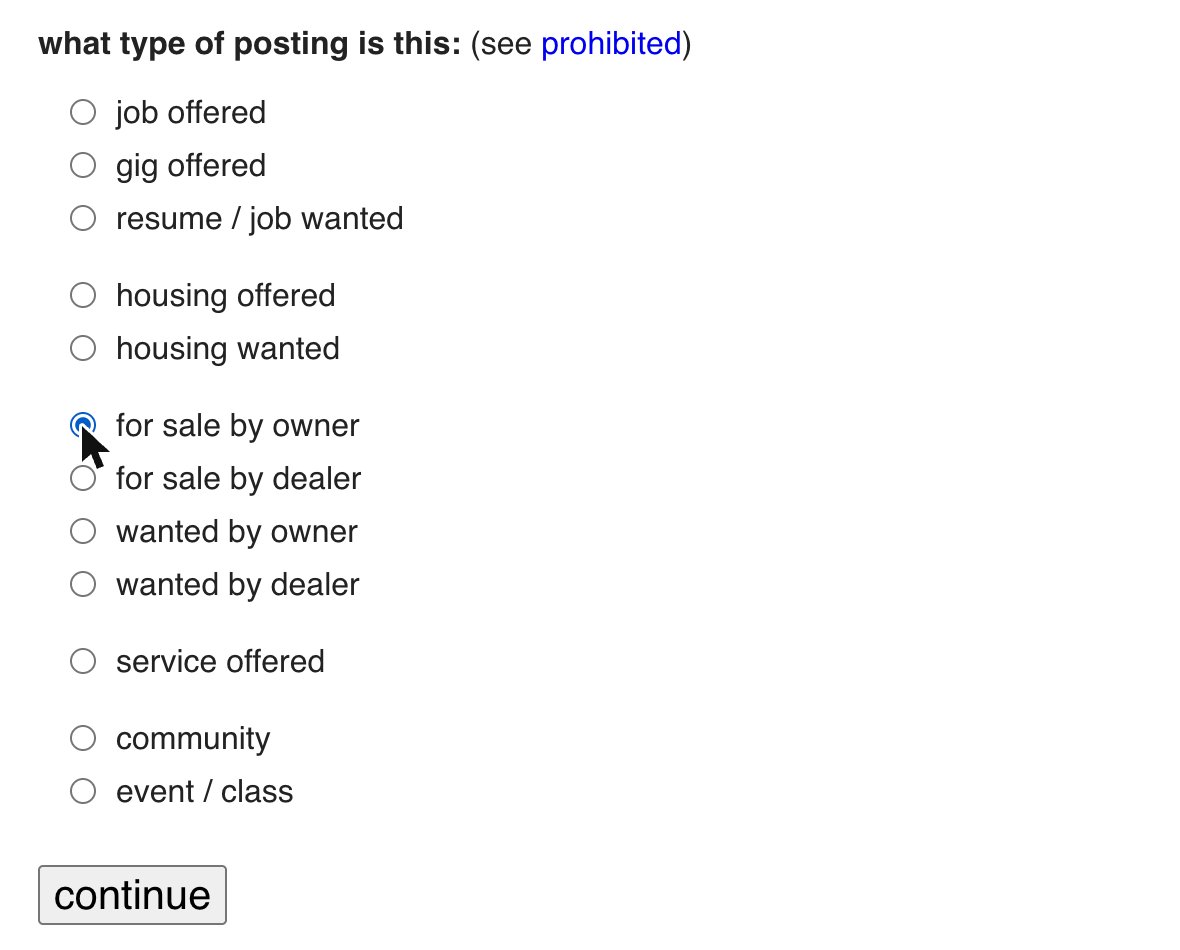
Pick the honest one. A business posting inventory as "by owner" is one of the fastest ways to get flagged, and dealer and service posts are paid for a reason.
Step 3: Choose a category
Next comes a long list of categories for that type. Pick the closest match. Buyers browse by category, so an appliance listed under "general for sale" gets seen less than one under "appliances."
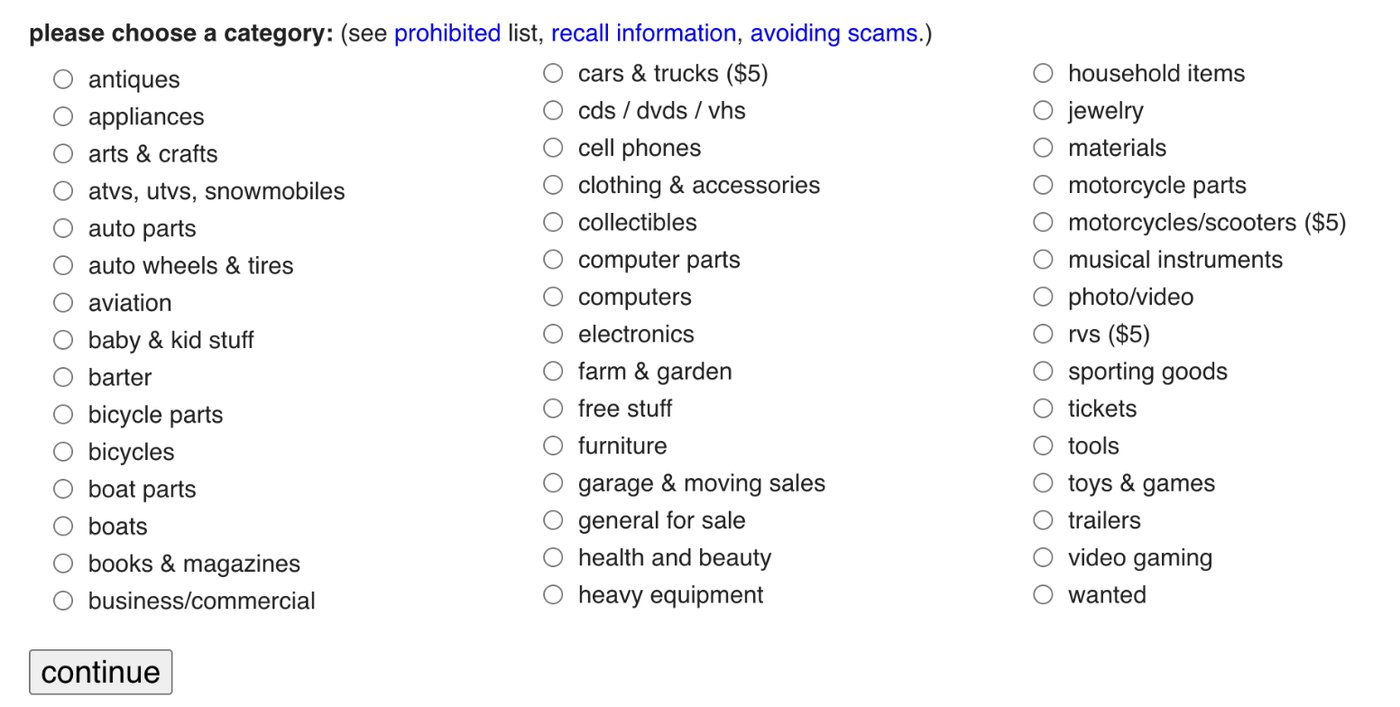
This screen also shows you which categories cost money. In for sale by owner, only cars & trucks, motorcycles/scooters and RVs show a fee ($5). Everything else, from furniture to free stuff, costs nothing.
Step 4: Write the title, price and description
Now the posting form. Fields outlined in green are required. For a for-sale post that's the posting title, ZIP code, description, your email and the language of the posting. Price and "city or neighborhood" aren't required, but fill them in. Ads without a price get skipped, and the neighborhood tells buyers how far they'd drive.
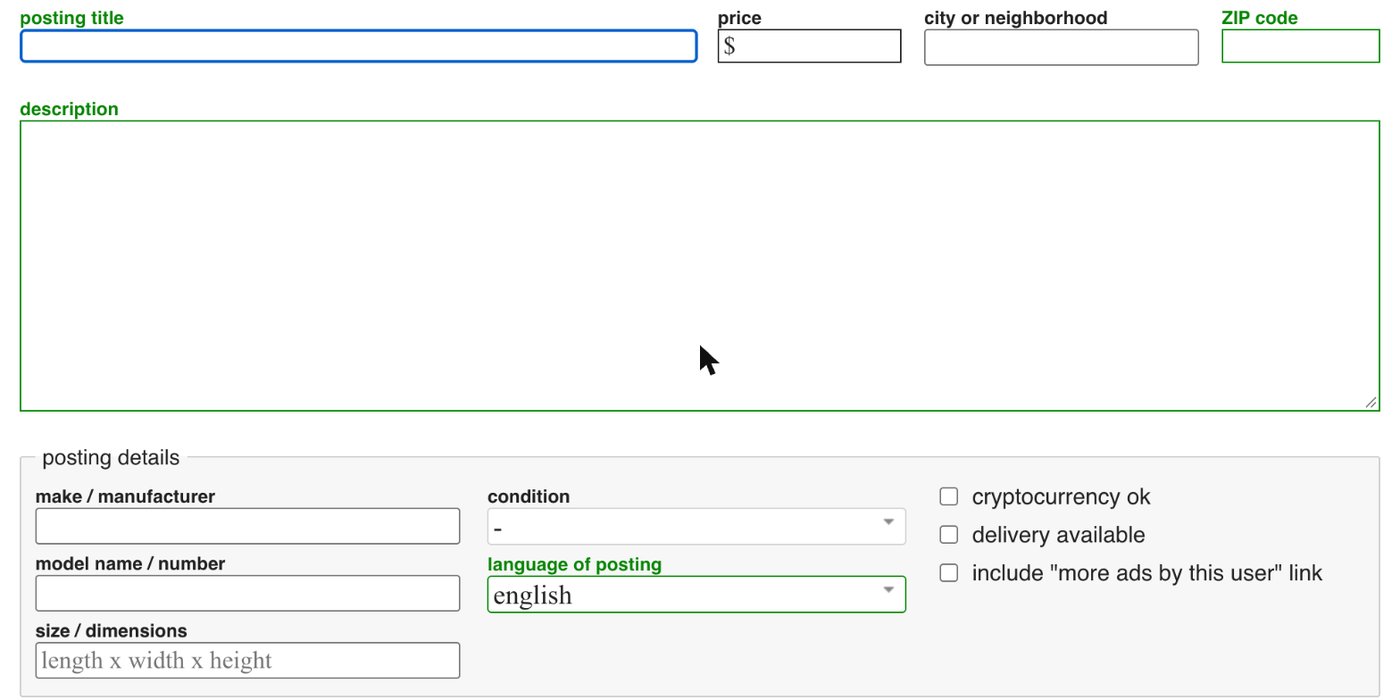
Below the description, Craigslist asks for posting details specific to the category. Appliances get make, model, size and condition, for example. Vehicles get year, make, model, mileage and title status. Housing gets rent, bedrooms and pet rules. These details power the filters buyers search with, so a blank one can hide your ad from a filtered search. There are also checkboxes for "delivery available" and "cryptocurrency ok."
How to write a title and description that get replies is covered further down.
Step 5: Choose how people can reach you
Under reply options you enter your email and decide how people can contact you:
- CL mail relay (always on for email) — replies reach your inbox, but buyers see a Craigslist relay address instead of your real one.
- CL chat — people can message you in the Craigslist app or on the website.
- publish phone number — shows your number on the ad for calls and texts.
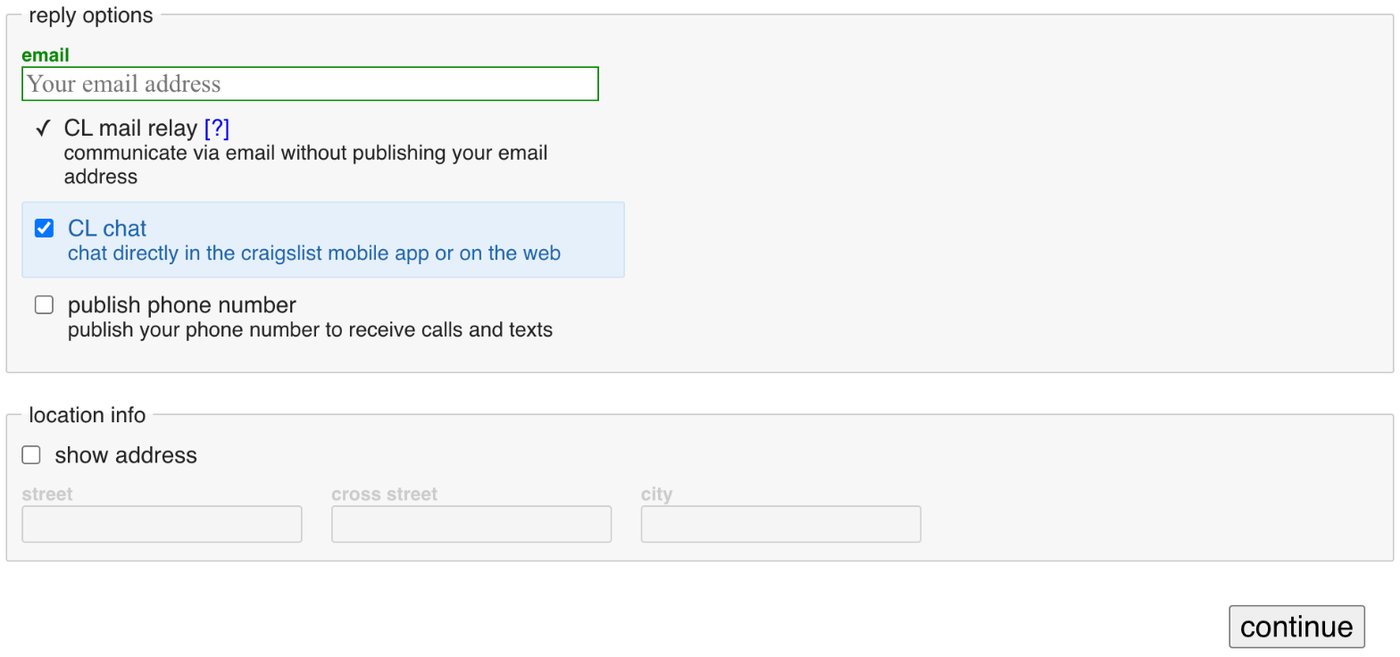
The location info box lets you show a street address. For anything sold out of your home, leave it unchecked and share the address only with a buyer you've agreed to meet.
Step 6: Confirm the map
After you click continue, Craigslist shows a map of your ZIP code area or address. Check it's right and click continue. The map is what puts your ad in "nearby" searches, so a wrong ZIP sends it to the wrong buyers.
Step 7: Add pictures
The image screen comes after the map. Click add images or drag photos onto the page. Each one shows a progress bar while it uploads, then a thumbnail with a red "x" to delete it. Drag the thumbnails to change the order. When you're done, click done with images. Photos are optional, and a few posting types don't allow them.
Step 8: Review the draft and publish
Craigslist now shows your ad exactly as it will appear, as an unpublished draft. Read it once as a buyer would: is the price right, is the first photo the best one, is the phone number correct? You can still edit from here. Paid categories show the fee on this screen and take payment before publishing. When it looks right, click publish.
Step 9: Confirm by email and phone
Most first-time posters get stuck here, because clicking publish isn't the last step:
- Check your email for a message from robot@craigslist.org and click the confirmation link. If the link won't click, copy it into your browser. Check spam if it hasn't arrived.
- Verify your phone if asked. Pick voice or text, enter the one-time code, and you're done. You can only request a new code once every 5 minutes. The number you verify with is never shown on the ad.
Craigslist says the posting should appear about 15 minutes after confirmation.
How to post on Craigslist with pictures that sell
Photos aren't required, but listings without them get passed over. What matters:
- The first photo is the one that sells. Craigslist uses it as the featured image in search results and at the top of the listing. Make it the clearest, best-lit shot of the whole item, not a detail.
- Shoot it where it is, in daylight. Real photos of the actual item beat catalog images. Buyers want to see condition, and stock photos read as a scam.
- Show what buyers will ask about: the label or model number, any damage, and something for scale. Fewer photos means more "is it still available / what's the model" messages.
- Order the rest like a walkthrough: front, side, back, details, flaws.
- If an upload fails, Craigslist's own fix is to resize the image, save it as a JPG, and make sure your connection is solid.
Write an ad that gets replies
The title
Your title is what shows in search results, so it has to answer the first questions a buyer has. A formula that works for most for-sale posts:
What it is + brand/model + key spec + condition + price
- Weak: "Fridge for sale"
- Strong: "Frigidaire 30" Refrigerator, Stainless, Excellent Condition, $250"
For jobs, lead with the role, the pay and the location ("Warehouse Associate, $19/hr, Ontario CA, Weekly Pay"). For rentals, lead with size, rent and area.
The description
Keep it short and scannable. Cover:
- What it is, in one sentence, including brand, model and size.
- Condition, honestly, including flaws. It saves a wasted trip for both of you.
- Price and whether it's firm.
- Pickup or delivery details: general area, when you're available, whether you can help load.
- How to reach you, matching the reply options you chose.
Avoid ALL CAPS, a wall of keywords, links that don't need to be there, and copying the same text into many near-identical ads. That's what spam filters and flaggers look for.
How much does it cost to post on Craigslist?
Most personal posts are free. Craigslist charges for categories that are usually commercial:
| What you're posting | Craigslist's fee |
|---|---|
| Most for sale by owner, most housing, community | Free |
| Cars & trucks, motorcycles, RVs (by owner) | $5 |
| Anything for sale by a dealer | $5 |
| Services | $5 |
| Commercial real estate | $5 |
| Apartment rentals in New York, Boston and Chicago | $5 |
| Gigs | $3–10, depending on the city |
| Jobs | $10–75, depending on the city |
Jobs and gigs vary by metro, and the exact fee only appears near the end of the flow. Our Craigslist fee calculator shows it for any city up front. The full breakdown is in Craigslist posting fees in 2026.
How to post a job on Craigslist
The flow is the same, with three differences. Choose job offered (or gig offered for one-off paid work) at step 2. Expect a fee of $10–75 depending on the city. And the form asks for compensation and employment type. The full walkthrough, with every city's fee, is in how to post a job on Craigslist. Hiring in more than one city is covered in how to post a job on Craigslist in multiple cities.
After it's live: renew, edit, repost, delete
- Renewing (free posts only): every 48 to 72 hours, a "renew" link appears next to the post on your account page. Clicking it moves the ad back to the top of the listings. That matters because in a busy category a new post slides off page one fast. We measured how fast.
- Reposting (paid posts): paid posts can't be renewed. You repost from your account page, which creates a new paid post. You may need to re-upload the images.
- Editing: use the link in your confirmation email or your account page to change the text, contact info, images or map. You can't change the posting type.
- Deleting: same place. Delete it as soon as it's sold or filled, so people stop contacting you.
- How long it lasts: paid posts run 30 days. Free posts run 45 days in most markets and 30 days in the biggest metros. Here's the data, or check any city with the ad expiration tool.
Why your Craigslist ad isn't showing up
If your ad isn't in the listings an hour after you posted it:
- You didn't confirm it. Find the email from robot@craigslist.org (check spam) and click the link.
- The phone check wasn't finished. Start the post again and complete it.
- It was flagged. Other users can flag a post off the site. Common triggers are the wrong category, a business posting as "by owner," duplicate ads, and pushy or vague copy. Here are the eight most common reasons Craigslist ads get flagged.
- It's live but hidden from search. Sometimes a post shows on your account page but never appears in search. Here's how to tell when Craigslist is ghosting your ad, and what to do.
Stay safe
Craigslist's own rule is worth repeating: it only asks for a phone verification code while you're posting. Anyone who contacts you about your ad and asks for "the code Craigslist sent you" is trying to take over your number or account. Don't share it. Meet buyers in a public place when you can, and don't ship items or accept overpayments from people you haven't met. More on pricing, meeting and getting paid in how to sell on Craigslist, and for vehicles, how to sell a car on Craigslist.
Don't want to do it yourself?
Posting one ad yourself is manageable once you know the screens. It gets tedious when you're doing it every week, in several cities, or for a business: phone checks, flagged posts, renewals and finding the right category in each metro. That's what we do.
Scale Classifieds posts your ad by hand for Craigslist's fee plus $15 per post in any of 413 US cities. A real person posts it and emails you the live link within 24–48 hours. If it's removed in the first 7 days, we repost it free. Selling your own things? See Craigslist posting for private sellers. Running a business? Start with Craigslist for business.
Frequently asked questions
Do I need a Craigslist account to post an ad?
No. You can post with just an email address and confirm through the link Craigslist emails you. An account makes it easier to edit, renew and repost, and renewing a free post is done from the account page.
Is it free to post on Craigslist?
Most for-sale-by-owner, housing and community posts are free. Craigslist charges $5 for cars and trucks, motorcycles, RVs, anything sold by a dealer, services and commercial real estate, $3 to $10 for gigs and $10 to $75 for jobs depending on the city.
How do I add pictures to a Craigslist ad?
After you confirm the map location, Craigslist shows an image screen. Click "add images" or drag photos onto the page, drag them into order (the first is the featured image), then click "done with images". If an upload fails, resize the photo and save it as a JPG.
How long does it take for a Craigslist ad to show up?
Craigslist says a posting should appear about 15 minutes after you confirm it. If it hasn't appeared after an hour, check that you clicked the confirmation email, then check whether it was flagged.
Why does Craigslist want my phone number?
Some postings require phone verification. Craigslist sends a one-time code by voice or text. It doesn't accept VOIP or international numbers, it won't show the verification number on your ad, and it only ever asks for that code during the posting process. Anyone else asking for it is running a scam.
How long does a Craigslist ad stay up?
Paid posts run 30 days. Free posts run 45 days in most markets and 30 days in the biggest metros such as Los Angeles, New York, Chicago and Seattle. You can renew a free post every 48 to 72 hours to move it back to the top; paid posts have to be reposted, which is a new paid post.
Can I edit a Craigslist ad after posting it?
Yes. Use the link in your confirmation email or your account page to change the text, contact info, images or map. You can't change the posting type, and only some categories can be switched within a type.
Can someone post my Craigslist ad for me?
Yes. Scale Classifieds posts it by hand for Craigslist's fee plus $15 per post, in any of 413 US cities, and emails you the live link within 24 to 48 hours. If a post is removed in the first 7 days, it's reposted free.
Sources
Rather not do all of that? We'll post it for you.
Send us the ad and photos once. A real person posts it in any of 413 cities and emails you the live link within 24–48 hours. Craigslist's fee + $15 per post, and a free repost if it's removed in the first 7 days.
Have us post it